The Ultimate Guide to Inference Caching for Large Language Models

The Ultimate Guide to Inference Caching for Large Language Models
If you have ever built something on top of a large language model API, you have probably felt the pain. Slow responses. Rising costs. The same system prompt being processed over and over again like the model has never seen it before. For small projects, this is annoying. At scale, it becomes a real problem.
Inference caching is the fix. It is a set of techniques for storing the results of expensive LLM computations and reusing them the next time a similar request comes in. When done right, it can cut token spend dramatically and reduce response times without touching your application logic.
This guide covers everything you need to know: how each caching type works, why it matters, when to use it, and how to combine them in production.
By the end, you will understand:
- What inference caching actually is and why it exists
- The three main caching types: KV caching, prefix caching, and semantic caching
- How each one works under the hood
- Which providers support what features
- How to choose the right strategy for your specific use case
What Inference Caching Actually Is
Before getting into the details, it helps to understand what problem inference caching is solving.
Every time you send a prompt to a large language model, the model does a significant amount of work. It reads every token in your input, builds up a rich understanding of the context, and generates each output token one at a time. That process takes compute, and compute costs money and time.
Now think about what a typical production LLM application looks like. You have a system prompt that is hundreds or thousands of tokens long. It contains your instructions, maybe a reference document, maybe some examples of how you want the model to behave. That system prompt is the same on every single request. The only thing that changes is the user's message at the end.
Without caching, the model reprocesses that entire system prompt from scratch on every request. That is a lot of wasted computation.
Inference caching is the practice of storing intermediate or final results from LLM computations and reusing them when an equivalent request arrives. “Equivalent” can mean exact (like byte-for-byte identical tokens at the start of a prompt) or approximate (like two questions that mean the same thing even if the wording is different).
There are three distinct caching layers to understand:
- KV caching runs inside the model on every request. It stores the intermediate attention states computed during generation so the model does not redo them on every decode step.
- Prefix caching extends that across multiple requests. When two requests share the same leading prompt tokens, the computation for that shared portion only needs to happen once.
- Semantic caching operates at the application level. It stores complete question-and-answer pairs and serves them back when a new question is semantically equivalent, even if the wording is different.
These three are not competing approaches. They work together at different layers of the stack.
KV Caching: The Foundation of It All
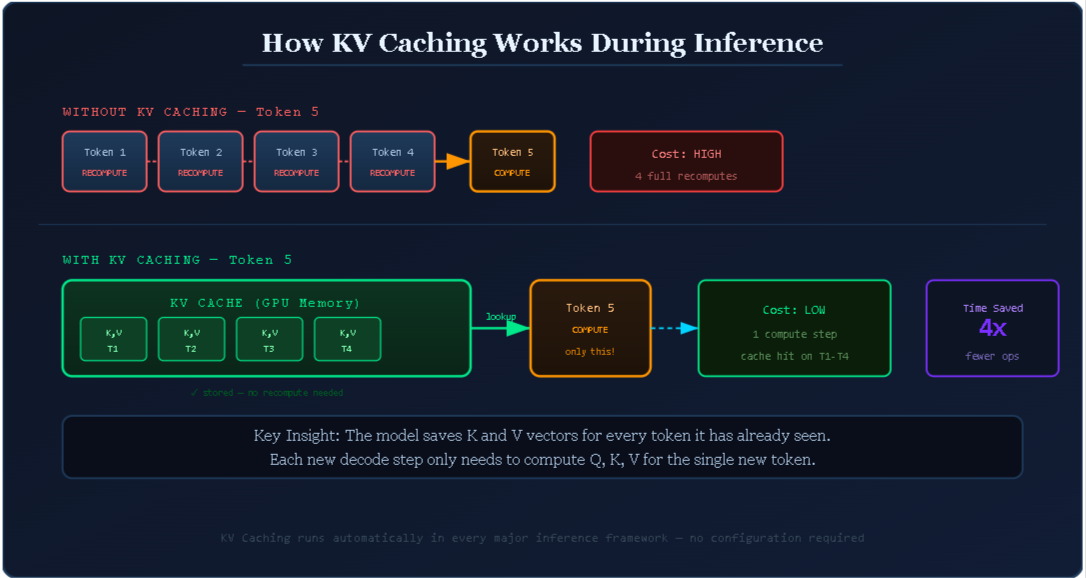
KV caching is the base layer. Every major LLM inference framework has it on by default. You do not need to configure anything to benefit from it. But you do need to understand it, because everything else builds on this concept.
How Transformer Attention Actually Works
Large language models use a transformer architecture, and transformers rely on a mechanism called self-attention. When the model processes a sequence of tokens, it does not treat each token in isolation. It looks at how every token relates to every other token in the sequence.
To do this, each token gets three vectors computed from its content:
- Q (Query): “What kind of information is this token looking for from others?”
- K (Key): “What kind of information does this token offer to others?”
- V (Value): “What actual content does this token carry?”
When the model generates a new token, it computes attention scores by comparing the new token's Query vector against the Key vectors of all previous tokens. Those scores determine how much attention the model pays to each earlier token. Then it uses those attention scores to weight the Value vectors and produce the output.
The result is that every token has access to the full context of everything that came before it. That is what makes transformers so good at language tasks.
The Problem With Autoregressive Generation
LLMs generate text one token at a time. Token 1 is generated, then token 2, then token 3, and so on. This is called autoregressive generation.
Without any optimization, generating each new token would require recomputing the Q, K, and V vectors for every single token that came before it. If you are generating token 100, you would need to recompute everything from tokens 1 through 99 just to produce that single new token. Then again for token 101. And again for token 102.
You can see why this gets expensive fast.
How KV Caching Solves This
KV caching is straightforward in concept. When the model computes the K and V vectors for a token during a forward pass, it saves them in GPU memory rather than discarding them. The next time the model needs to generate a new token, it loads the stored K and V pairs from memory instead of recomputing them. Only the brand new token at the end of the sequence needs fresh computation.
Here is a simple way to think about it:
Without KV caching (generating token 100): Recompute K, V for tokens 1 through 99, then compute token 100.
With KV caching (generating token 100): Load stored K, V for tokens 1 through 99 from memory, then compute token 100 only.
The savings grow with sequence length. The longer your prompt and the longer your output, the more KV caching helps.
This optimization happens inside the model on every single request. You benefit from it automatically, whether you are using the OpenAI API, Anthropic's API, or running a model yourself with a framework like vLLM. It is not something you turn on. It is just always there.
But here is the key limitation: standard KV caching only operates within a single request. Once the request is done, the cache is gone. The next request starts fresh.
That is where prefix caching comes in.
Prefix Caching: Making Caching Work Across Requests
Prefix caching takes the KV caching concept and extends it to work across multiple requests. The idea is simple: if two requests share the same tokens at the beginning of their prompts, there is no reason to compute the KV states for that shared portion twice.
The cached portion is called the prefix, and the rule is straightforward: the prefix must be byte-for-byte identical across requests. Not just similar. Not semantically equivalent. Exactly the same tokens in the same order.
The Real-World Impact on Production Apps
Think about what a typical production application looks like at scale.
You have a coding assistant. Every request starts with a 2,000-token system prompt explaining the assistant's persona, coding standards, a reference architecture document, and some examples. After that prefix, each user sends their own question.
Without prefix caching, every single user request causes the model to reprocess all 2,000 tokens of that system prompt. If you are handling 10,000 requests per day, that is 20 million tokens being processed redundantly every single day, for no reason other than the lack of caching.
With prefix caching, those 2,000 tokens are computed once. Every subsequent request that starts with that same system prompt skips straight to processing the user's actual question. The KV states for the prefix are loaded from the cache in milliseconds.
For a RAG (Retrieval Augmented Generation) pipeline where you are injecting a large reference document into every prompt, the savings are even more dramatic. A 10,000-token document that gets included in every request costs 10,000 tokens per call without prefix caching. With it, that cost approaches zero after the first call.
The One Rule You Cannot Break
Prefix caching has one hard requirement: the cached portion must be completely identical. A single character difference invalidates the cache.
This has real implications for how you write code. If you inject dynamic content into your system prompt, such as today's date, a session ID, the user's name, or a timestamp, and that content appears before the static content, the cache will never hit. Every request will have a different prefix.
The golden rule is: put static content first, dynamic content last.
Your system prompt, reference documents, and few-shot examples should always be the first thing in your prompt. The user's message, the conversation history, and any per-request variables should come at the very end.
Similarly, if you are injecting JSON objects or dictionaries into your prompts, be careful about key ordering. If the key order varies between requests even when the underlying data is the same, the cache will miss. Always serialize your objects with a consistent, deterministic ordering.
How Different Providers Handle Prefix Caching
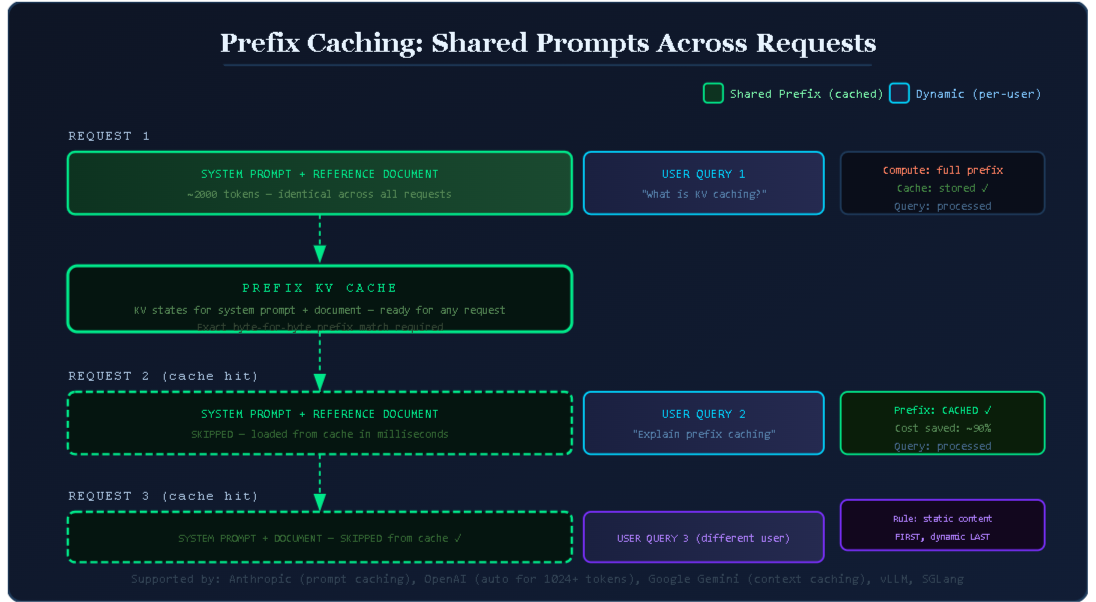
The major API providers all support some form of prefix caching, but they implement it differently.
Anthropic calls it prompt caching. You opt in explicitly by adding a cache_control parameter to the content blocks you want cached. This gives you control over exactly which parts of your prompt get cached.
OpenAI applies prefix caching automatically for prompts longer than 1,024 tokens. There is nothing to configure. As long as your prompts are long enough and structured correctly with the stable prefix first, caching kicks in on its own.
Google Gemini calls it context caching. You can cache large documents and reference materials explicitly, and they are stored separately from your inference calls. Gemini charges for cached context storage separately from inference costs, which makes it most cost-effective for very large contexts that are reused many times.
Self-hosted models using frameworks like vLLM or SGLang support automatic prefix caching at the inference engine level. This is managed transparently by the engine without any changes to your application code. If you are running your own infrastructure, this is one of the biggest wins you can get with minimal effort.
Semantic Caching: Skipping the Model Entirely
KV caching and prefix caching both operate inside or close to the model. Semantic caching is different. It operates at the application layer, above the model entirely.
The idea: if someone asks “How does LLM inference caching work?” and you have already answered “Can you explain inference caching for language models?” the two questions are asking the same thing. There is no reason to call the model again. Just return the answer you already have.
Semantic caching stores complete input-output pairs from previous LLM calls. When a new query comes in, it checks whether a semantically similar question has already been answered. If yes, it returns the cached answer without calling the model at all. If no, it calls the model, stores the result, and returns it.
How the Matching Works
The matching is done through vector embeddings and similarity search.
When a query comes in, you first compute an embedding of that query using an embedding model. An embedding is a list of numbers that captures the meaning of the text. Queries that mean similar things will have embeddings that are close to each other in vector space.
You then search a vector database for any stored query embeddings that exceed a similarity threshold, typically measured using cosine similarity. If a match is found above the threshold, you return the cached response. If not, you proceed with the model call.
Here is the full flow:
- New query arrives at your application.
- Compute the embedding vector for the query.
- Search the vector database for stored embeddings with cosine similarity above your threshold.
- If a match is found: return the cached response immediately. No model call made.
- If no match is found: call the LLM, store the query embedding and response in the vector database, return the response.
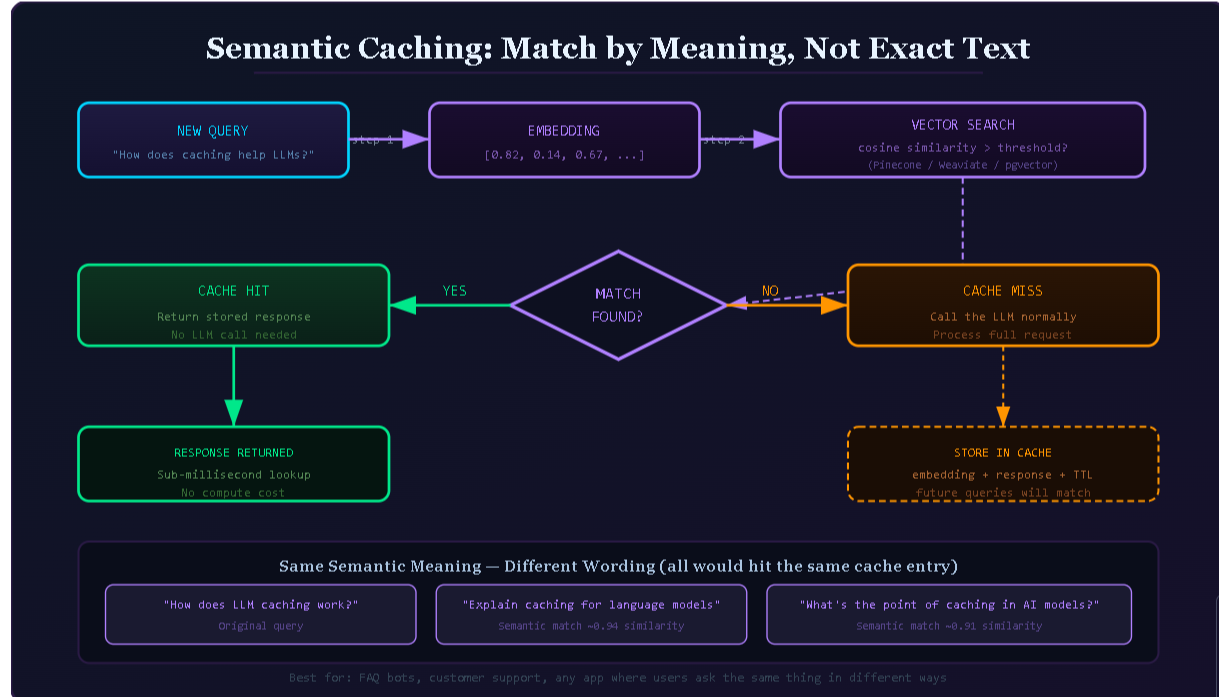
The vector database you use depends on your infrastructure. Pinecone, Weaviate, and Qdrant are popular managed options. If you are already on PostgreSQL, pgvector is a natural fit. For caching specifically, Redis with vector search capabilities works well for low-latency lookups.
You should also attach a TTL (time-to-live) to your cached entries. If your application's answers can become outdated, such as answers about current events, pricing, or anything that changes over time, you do not want a cached response from three months ago being served to users today.
When Semantic Caching Actually Makes Sense
Semantic caching adds overhead to every single request. You have the embedding computation step plus the vector search step before you even know whether to call the model. For that overhead to be worthwhile, you need a high enough cache hit rate.
This means semantic caching works best in specific situations:
- FAQ-style applications where users repeatedly ask the same set of common questions
- Customer support bots where a large fraction of incoming questions are variations of known issues
- Search-heavy applications where users phrase the same research questions differently
- High-volume deployments where the reduced model calls pay for the infrastructure cost
If your application handles genuinely unique requests most of the time, such as helping users write custom essays or generating original code, semantic caching will have a low hit rate and you will just be adding latency for no benefit.
The way to know is to measure. Track your actual query patterns before investing in semantic caching infrastructure. If a significant portion of your queries are variations of common questions, it is worth building. If not, prefix caching alone will give you better returns with less complexity.
Setting the Similarity Threshold
The similarity threshold is a dial you have to tune carefully.
If you set it too high, close to 1.0, you will get very few cache hits because only near-identical questions will match. You will add embedding and search latency to every request without much benefit.
If you set it too low, around 0.7 or below, you risk returning cached responses that are not actually relevant to the new question. A user asking about “caching in Redis” and a user asking about “caching in LLMs” might have a cosine similarity above 0.7 in some embedding spaces. Returning the wrong answer is worse than computing a new one.
Most production systems settle somewhere between 0.85 and 0.95, but the right value depends on your embedding model, your domain, and how much variation you expect in how users phrase similar questions. Start conservative at around 0.92 and adjust based on observed hit rates and response quality.
Choosing the Right Caching Strategy
Now that you understand how each layer works, the question becomes: which ones should you use, and when?
The answer depends on your application, but there is a useful framework for thinking about it.
KV Caching: Always On, Nothing to Do
KV caching is already running. You do not choose to use it. Every request you make to any major LLM provider or any inference framework benefits from KV caching automatically.
Your only job here is to understand why it exists so you can reason clearly about the other two layers.
Prefix Caching: The Highest-Leverage First Step
For almost every production LLM application, prefix caching is the first and most impactful optimization to add.
If your application has any of these characteristics, prefix caching will save you significant money and latency:
- A system prompt longer than a few hundred tokens that is the same across requests
- A reference document or knowledge base injected into every prompt
- Few-shot examples that appear in every request
- Multi-turn conversations where earlier turns of the conversation are shared across related requests
The implementation effort is low. The savings can be enormous. If you are on Anthropic, you add cache_control to your content blocks. If you are on OpenAI with prompts longer than 1,024 tokens, it is already on. If you are running your own models with vLLM, it is a configuration flag.
The main thing to get right is prompt structure: static content always before dynamic content.
Semantic Caching: The Right Tool for the Right App
Semantic caching is worth adding when:
- Your application handles high volumes of queries
- A significant fraction of those queries are variations of the same questions
- Consistency of responses to similar questions is acceptable or desirable
- The infrastructure overhead is justified by the expected hit rate
It is not the right choice for:
- Applications where every query is genuinely unique
- Low-volume applications where the infrastructure overhead is not justified
- Applications where freshness matters so much that serving cached responses is risky
Combining All Three Layers
The most effective production systems use all three layers together, and they complement each other well.
KV caching is always running underneath. You build on that foundation by adding prefix caching for your system prompt and any large static context. That handles the high-cost, repeated processing of shared content. Then, on top of that, you add semantic caching if your query patterns justify it. When a semantically equivalent question has been answered before, the request never even reaches the model or the prefix caching layer.
Think of it as a series of filters. Semantic caching catches common repeated questions at the application layer. Prefix caching reduces the cost of processing new questions that share common context. KV caching accelerates the generation of each response token by token.
Here is a practical decision table:
| Your situation | What to add |
|---|---|
| Any LLM application | KV caching (automatic, done) |
| Long system prompt shared across users | Prefix caching |
| RAG pipeline with a large shared document | Prefix caching for the document block |
| Agent workflows with large stable context windows | Prefix caching |
| High-volume app with repeated question patterns | Semantic caching |
| All of the above | All three, layered |
Prompt Design Tips for Maximum Cache Effectiveness
Understanding caching is one thing. Designing prompts that actually benefit from it is another. Here are the practical patterns that matter.
Structure matters more than content. A perfectly written system prompt that starts with a dynamic timestamp will never hit the prefix cache. A moderately written system prompt that keeps all static content at the front will hit it on every request after the first.
Avoid dynamic injections in the prefix. Session IDs, user names, current dates, and request-specific metadata should all go at the very end of your prompt, after the system instructions and any shared context.
Use consistent serialization. If you are building structured prompts programmatically, ensure your JSON serialization, template formatting, and content ordering are deterministic. Any variability in how you construct the shared prefix will kill your cache hit rate.
Be intentional about when you break the cache. Sometimes you need to update your system prompt, add a new example, or change your instructions. When you do this, the cache for the old prefix becomes useless. That is fine and expected. Just be aware that after an update, the first round of requests will incur full computation costs while the new cache warms up.
For semantic caching, monitor your hit rate closely. The hit rate is your primary signal. If it is below 20 percent, either your queries are genuinely too diverse for semantic caching to help, or your similarity threshold is set too high. If it is above 80 percent, you might be matching queries that are too different and risking response quality issues.
Why This Matters for Real Applications
Let me give you a concrete sense of why these optimizations are worth caring about.
Say you are running a customer support bot for a software product. Your system prompt is 3,000 tokens. You handle 50,000 requests per day. Without prefix caching, you are paying for 150 million tokens per day just to process the system prompt, every single time.
With prefix caching, you pay for those 3,000 tokens once per cache period. The rest of your per-request token spend goes to the actual user queries and responses. At current API pricing, the difference in monthly cost between a cached and uncached system prompt at that scale can run into tens of thousands of dollars.
The latency story is similar. A 3,000-token system prompt processed from scratch adds meaningful time to every response. With prefix caching, that processing time is eliminated from every cached request.
For semantic caching, imagine 40 percent of your 50,000 daily requests are variations of the 200 most common questions. With a semantic cache handling those hits, you eliminate 20,000 model calls per day. Your compute costs drop, your response times drop for those users (vector search is much faster than LLM inference), and your system handles load spikes more gracefully because a cache hit is cheap.
These are not theoretical numbers. They reflect the kinds of savings that engineering teams report when they go from uncached to properly cached production systems.
A Quick Note on Cache Invalidation
Caching creates one challenge that is worth flagging explicitly: you have to decide when cached content is no longer valid.
For prefix caching, this is mostly handled automatically. If you update your system prompt, new requests with the updated prompt will miss the old cache and build a new one. You do not need to manually invalidate anything.
For semantic caching, you need to think more carefully. Cached responses can become stale if the underlying information changes. If your bot answers questions about a product, and the product gets a major update, the old cached answers might now be wrong or misleading.
The practical solution is TTLs. Set an expiration time on your cached responses that matches how frequently the underlying information changes. For relatively stable domains, a TTL of days or weeks might be fine. For fast-changing information, you might need TTLs of hours or even shorter.
You can also build manual invalidation workflows. When you update your knowledge base or change your system prompt, you trigger a cache flush. The first round of requests after the flush will rebuild the cache with fresh, accurate responses.
Putting It All Together
Inference caching is one of the most practical and high-return optimizations available to anyone building on top of large language models. It does not require changing your model, retraining anything, or rearchitecting your application from the ground up.
KV caching is already working for you. You do not have to do anything for it.
Prefix caching is the move that most production applications should make as soon as possible. Get your prompts structured correctly with static content first, then enable caching through whichever provider you are on. The effort is small and the payoff is real.
Semantic caching is the layer you add when you have measured your query patterns and confirmed that enough of your traffic is repeated questions in different words. At that point, the infrastructure investment pays for itself quickly.
The best version of this is all three working together. KV caching running inside every request. Prefix caching eliminating redundant processing of your shared context. Semantic caching short-circuiting the model entirely for questions you have already answered.
You do not need to build all three at once. Start with prompt structure and prefix caching. Measure what it saves you. Then, if your usage patterns support it, build semantic caching on top.
The goal is the same across all three layers: avoid paying twice for computation that has already been done. Your users get faster responses. Your costs come down. And your application gets more capacity to handle the traffic that actually needs fresh computation.
That is what inference caching is for. And now you know how to use it.
More Posts:
- OpenAI Launches $100 ChatGPT Pro Plan with 5x Higher Codex Limits Than Plus
- What Is Search Box Optimization (SBO) and Why It’s the Next Big Thing in Digital Marketing
- How One AI Platform Is Replacing 10 Separate Tools (And Why Creators Are Taking Notice)
- Anthropic Unveils Claude Opus 4.7
- OpenAI Unveils GPT-Rosalind, a Restricted-Access Life Sciences Model Alongside an Expanded Codex GitHub Plugin