What is RAG? How retrieval-augmented generation actually works (with a real project)
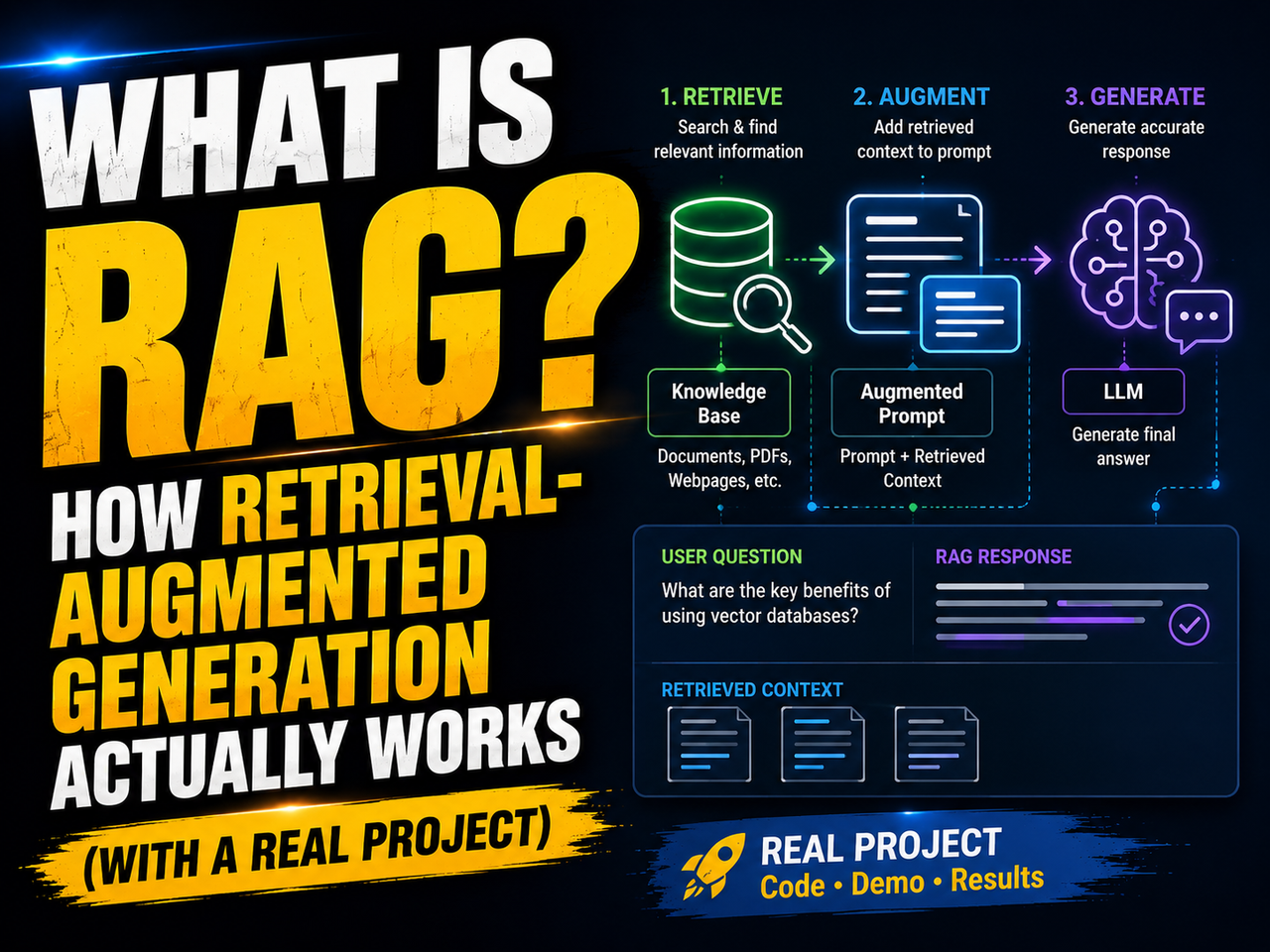
What is RAG? How retrieval-augmented generation actually works (with a real project)
Your AI assistant just confidently gave you completely wrong information. It cited a policy that was updated two years ago, quoted a number that doesn't exist, and apologized for nothing. Sound familiar?
This is not a bug in the traditional sense. It is a structural limitation baked into how large language models (LLMs) work. And there is a well-established solution that most serious AI applications now use: retrieval-augmented generation, or RAG.
Let's get into what it actually is, why it matters, and how to build something real with it.
The core problem: what LLMs do and do not know
An LLM like GPT-4, Gemini, or Claude learns by processing a huge slice of the internet and books and code. That process ends at a specific point in time. After training is complete, the model's knowledge is frozen. It cannot browse the web. It cannot read your company's internal documentation. It has no idea what happened last Tuesday.
Ask it something outside its training window, or something about private data it has never seen, and one of two things happens. It says it doesn't know. Or it makes something up that sounds convincing. The second one is the dangerous outcome, and it has a name: hallucination.
Even if you try to paste your entire knowledge base into a prompt, you will hit context window limits fast. Modern models have gotten better at handling longer contexts, but dumping 500 documents into a prompt is slow, expensive, and the model tends to lose track of things buried in the middle. Researchers call this the “lost in the middle” problem, and it is well documented in academic literature.
Fine-tuning the model on your private data is another route, but it is expensive to run, requires machine learning expertise, and the moment your data changes, you need to do it again.
RAG sidesteps all of this.
What RAG actually does
The name breaks down simply. Retrieval means finding relevant information from a data source. Augmented means adding that information into the prompt. Generation means the LLM writes a response based on what it was just given.
Think of it this way: instead of asking someone to answer from memory, you hand them the relevant pages from the manual and say, “read this, then answer.” The model's job shifts from recall to comprehension. That is a much more reliable task.
The result is an AI system that can answer questions about your specific documents, your database records, your internal wikis, or anything else you feed into it, without retraining a single weight in the underlying model.
How the pipeline works, step by step
RAG is not one thing. It is a sequence of processes that each play a distinct role. Here is how they connect.
Ingestion: loading and chunking your documents
The first stage happens before any user ever sends a message. You load your source documents, whether they are PDFs, markdown files, web pages, or database exports, and you break them into smaller pieces called chunks.
Why chunks? Because you do not want to retrieve an entire 300-page report when the user asks a specific question. You want the two paragraphs that actually contain the answer. Smaller, targeted chunks improve both retrieval accuracy and the quality of the final response.
A common chunking approach uses overlapping windows. If your chunk size is 500 characters and your overlap is 50, consecutive chunks share 50 characters at their boundary. This prevents useful information from being split awkwardly at a boundary edge.
Embeddings: turning text into numbers
This is the part people find most confusing. An embedding model takes a piece of text and converts it into a vector, which is just a list of numbers. These numbers represent the semantic meaning of the text.
Words or sentences with similar meanings end up with vectors that are mathematically close to each other. “Annual leave policy” and “vacation days allowance” would produce vectors that are nearby in vector space, even though they share no exact words. This is called semantic similarity, and it is what makes RAG powerful.
Popular embedding models include OpenAI's text-embedding-3-small, Google's embedding-001, and open-source options like those from Sentence Transformers, which you can run entirely locally.
Vector databases: storing and searching meaning
Once every chunk has been embedded, you store those vectors in a database built specifically for this. A regular SQL database finds exact keyword matches. A vector database finds the closest vectors, meaning the most semantically similar content.
When a user asks a question, that question also gets embedded. The vector database then performs a similarity search, scanning all stored vectors and returning the ones closest to the query vector.
Well-known vector databases include ChromaDB (open-source, easy to run locally), Pinecone (managed cloud service), Weaviate, and FAISS from Meta. Each has different trade-offs around performance, scaling, and ease of setup.
Prompt augmentation: building the final query
You now have the user's question and the retrieved chunks. You combine them into a single prompt using a template that tells the model to use only the provided context when answering.
A basic version looks like this:
You are a helpful assistant. Answer the user's question using ONLY the following context.
If the answer is not in the context, say you don't know.

Context:
{retrieved_chunks}

Question:
{user_question}
That instruction, “use only the following context,” is what stops the model from mixing in its training data and potentially hallucinating information you did not provide.
Generation: the LLM responds
The full, augmented prompt goes to the LLM. The model reads the context, reads the question, and produces a response grounded in your actual documents.
Why semantic search beats keyword search for this job
Before we build, it is worth pausing on why keyword search is the wrong tool for retrieval in most RAG pipelines.
A keyword search engine looks for exact matches. If the user asks “what happens if I terminate the contract early?” and your document uses the phrase “early termination provisions,” a keyword search will likely return nothing unless those specific words overlap with the query.
Semantic search does not care about word overlap. It cares about meaning. The vector for “terminate the contract early” and the vector for “early termination provisions” will be very close to each other in the embedding space, because they describe the same legal concept. The retriever will find the right chunk regardless of whether the user used the exact legal terminology.
This is the main reason RAG outperforms simple document search tools in practice. It meets users where they are, not where your documents happen to use specific phrasing.
That said, there are cases where keyword matching still wins. If someone searches for a very specific clause number, like “Section 8.3(b),” semantic search might retrieve conceptually related clauses rather than the exact one. This is why advanced systems often run both methods in parallel and merge the results, a pattern called hybrid search. We will come back to that later.
Building a real RAG project: a legal document assistant
Instead of a generic “chat with PDF” demo, let's build something with a concrete use case: a legal document assistant that lets a user ask questions about contract clauses.
Imagine you are at a small firm and you have stacks of NDAs, service agreements, and employment contracts in PDF form. New colleagues constantly ask questions like “what is the notice period in the standard service agreement?” or “what does the IP assignment clause say?” This assistant answers those questions directly, citing the relevant section.
We will use Python, LangChain for the pipeline orchestration, Google Gemini for the embedding model and LLM (the free tier works for this), and ChromaDB as our local vector store.
Project setup
Create a new directory and set up a virtual environment:
mkdir legal-rag-assistant
cd legal-rag-assistant
python3 -m venv venv
source venv/bin/activate  # On Windows: venv\Scripts\activate
Install dependencies:
pip install langchain langchain-google-genai langchain-community chromadb python-dotenv pypdf
Get a free API key from Google AI Studio and add it to a .env file:
GOOGLE_API_KEY=your_key_here
Place one or more contract PDFs into a folder called contracts/ inside your project directory.
Step 1: Load all contracts
Create a file called legal_rag.py and start with loading:
import os
from dotenv import load_dotenv
from langchain_community.document_loaders import PyPDFLoader
from langchain_text_splitters import RecursiveCharacterTextSplitter
from langchain_google_genai import GoogleGenerativeAIEmbeddings, ChatGoogleGenerativeAI
from langchain_community.vectorstores import Chroma
from langchain_core.prompts import PromptTemplate
from langchain_core.runnables import RunnablePassthrough

load_dotenv()

contracts_folder = "contracts"
all_documents = []

for filename in os.listdir(contracts_folder):
    if filename.endswith(".pdf"):
        path = os.path.join(contracts_folder, filename)
        loader = PyPDFLoader(path)
        docs = loader.load()
        # Tag each chunk with its source filename for attribution later
        for doc in docs:
            doc.metadata["source_file"] = filename
        all_documents.extend(docs)

print(f"Loaded {len(all_documents)} pages across all contracts.")
Loading multiple contracts at once and tagging them by filename means the assistant can later tell you which contract a clause came from. That is a small detail that makes the output genuinely useful in a real workflow.
Step 2: Chunk the text
text_splitter = RecursiveCharacterTextSplitter(
    chunk_size=600,
    chunk_overlap=80
)

chunks = text_splitter.split_documents(all_documents)
print(f"Created {len(chunks)} chunks from all contracts.")
The overlap of 80 characters here is slightly higher than a default setup. Legal language often has clause structures that span paragraph boundaries, and the extra overlap reduces the chance of a critical clause ending mid-chunk.
Step 3: Embed and store
print("Embedding chunks and storing in ChromaDB...")

embeddings = GoogleGenerativeAIEmbeddings(model="models/embedding-001")

vector_db = Chroma.from_documents(
    documents=chunks,
    embedding=embeddings,
    persist_directory="./legal_chroma_db"
)

print("Vector database ready.")
The persist_directory argument tells ChromaDB to save the vectors to disk. This matters in a real application because you do not want to re-embed hundreds of pages every time the script runs. Load it once, save it, then reload from disk on future runs.
Step 4: Build the retrieval chain
retriever = vector_db.as_retriever(
    search_type="similarity",
    search_kwargs={"k": 5}
)

llm = ChatGoogleGenerativeAI(model="gemini-1.5-flash", temperature=0)

prompt_template = PromptTemplate.from_template("""
You are a legal document assistant for a law firm.
Answer the question using ONLY the contract clauses provided below.
If the answer cannot be found in the context, say: "I could not find this in the loaded contracts."
Always mention which contract file the information came from.

Context:
{context}

Question:
{question}

Answer:
""")

def format_docs(docs):
    formatted = []
    for doc in docs:
        source = doc.metadata.get("source_file", "unknown")
        formatted.append(f"[Source: {source}]\n{doc.page_content}")
    return "\n\n".join(formatted)

rag_chain = (
    {"context": retriever | format_docs, "question": RunnablePassthrough()}
    | prompt_template
    | llm
)
Setting temperature=0 on the LLM tells it to be as deterministic as possible. For a legal assistant, you want exact, factual answers from the documents, not creative paraphrasing.
Fetching k=5 chunks means the retriever pulls the five most semantically relevant sections. For short contracts this is fine. For large document collections you may want to tune this number, but five gives a good balance between coverage and noise.
Step 5: Run the interactive assistant
print("\nLegal document assistant ready. Type 'quit' to exit.\n")

while True:
    question = input("Ask a question about your contracts: ").strip()
    if question.lower() == "quit":
        break
    if not question:
        continue

    response = rag_chain.invoke(question)
    print(f"\nAssistant: {response.content}\n")
Now run it:
python legal_rag.py
You can ask things like:
- “What is the notice period for termination in the service agreement?”
- “Which contracts include a non-compete clause?”
- “What are the payment terms in the NDA?”
The assistant will pull the relevant clauses and tell you which file they came from. No hallucination. No mixing up contracts. Just answers grounded in the actual text.
What can go wrong
RAG is not magic. It has failure modes worth knowing before you build on top of it.
Retrieval failure. If the relevant chunk is not retrieved, the model gets no context and either says it doesn't know or hallucinates. This is the most common issue. Bad chunking, weak embedding models, or a value of k that is too small can all cause this. Testing your retriever in isolation before adding the LLM layer is a smart habit.
Chunk boundary problems. A clause split awkwardly across two chunks may not retrieve cleanly. The overlap parameter helps, but it does not eliminate the issue. Some teams experiment with document-level metadata or parent-child chunking strategies to address this.
Irrelevant retrieved chunks. The retriever finds chunks that are near the query vector but do not actually answer the question. The LLM then answers based on loosely related content. Adding a reranking step using a model like Cohere Rerank or cross-encoders can filter out the noise before the context reaches the LLM.
Poor prompt design. If your template does not clearly tell the model to stay within the context, it will drift into its training data. The instruction “use only the following context” is not optional.
Where RAG goes from here
Basic RAG, the architecture described above, works well for many use cases. More advanced setups add layers on top.
Hybrid search combines vector similarity search with traditional keyword (BM25) search and merges the results. This helps when users ask very specific questions with exact terms that semantic search alone might miss. Libraries like LangChain's EnsembleRetriever make this relatively easy to implement.
HyDE (hypothetical document embeddings) generates a hypothetical answer to the user's question, embeds that hypothetical answer, and uses it to search the vector store. The idea is that a good hypothetical answer lives closer in vector space to the real answer than the raw question does. Research from Google showed this can improve retrieval accuracy meaningfully.
Agentic RAG gives the model tools to decide when to retrieve, what to search for, and whether to retrieve again if the first attempt comes back empty. Frameworks like LlamaIndex and LangChain both have agent primitives that support this pattern.
GraphRAG, developed by Microsoft Research, represents documents as knowledge graphs rather than flat chunks. This lets the retriever follow relationships between entities, which is particularly useful for complex research tasks where the answer requires connecting information from multiple sources.
Choosing the right tools for your stack
The ecosystem around RAG has expanded quickly. A few practical notes:
For embedding models, Google's embedding-001 and OpenAI's text-embedding-3-small are strong defaults. If you need to run everything locally without sending data to a third party, nomic-embed-text via Ollama is a solid open-source choice.
For vector databases, ChromaDB is the easiest starting point for local development. For production workloads with millions of vectors, Pinecone or a self-hosted Weaviate instance are more appropriate.
For orchestration, LangChain is the most widely adopted framework, though LlamaIndex has strong support for document-heavy workflows and is worth comparing for complex ingestion pipelines.
For evaluation, measuring whether your RAG system actually works is harder than building it. Tools like RAGAS provide metrics for retrieval quality and answer faithfulness that help you catch regressions as you iterate.
A note on what RAG is not
RAG does not make a model smarter. It gives the model better information to work with. The reasoning and language quality still come from the underlying LLM. If you ask a question that requires nuanced legal reasoning, RAG will retrieve the relevant clauses but the quality of the analysis depends on the model itself.
RAG also does not solve all privacy concerns. Your documents still go through an embedding model API and the LLM API, unless you run everything locally. For highly sensitive data, local models via Ollama combined with a local vector store like ChromaDB keep everything on your own infrastructure.
And RAG requires maintenance. Documents change. Policies get updated. New contracts get signed. You need a pipeline that re-embeds updated documents and keeps the vector store current, or your system will gradually drift out of sync with reality.
Getting to production
The gap between a working demo and a production system is larger than most people expect.
A production RAG system needs document update pipelines that detect when source files change and re-embed only the affected chunks. It needs logging so you can inspect what was retrieved for any given query and debug failures. It needs access controls if different users should see different subsets of documents. And it needs latency monitoring, because embedding a query, searching a vector database, and calling an LLM all add up.
None of that is reason to avoid building. Start with the simple version. Get it working. Then add the production layers incrementally as your understanding of actual failure modes grows.
The legal assistant above is a few dozen lines of Python. It is genuinely useful. It can answer questions that currently eat up time across an entire team. That is worth something, and it is a real foundation to build on.
Debugging your retriever before blaming the LLM
One mistake beginners make repeatedly: they assume the LLM is the problem when answers are bad. In most cases, the retriever is the culprit.
Before integrating the LLM into your chain, test the retriever in isolation. Pull the top five chunks for a sample question and read them yourself. Are they actually relevant? Do they contain the information needed to answer the question? If you as a human cannot answer the question from those chunks, the LLM definitely cannot.
Here is a quick way to inspect what your retriever is pulling:
test_question = "What is the notice period for contract termination?"
retrieved = retriever.invoke(test_question)

for i, chunk in enumerate(retrieved):
    print(f"\n--- Chunk {i+1} ---")
    print(f"Source: {chunk.metadata.get('source_file', 'unknown')}")
    print(chunk.page_content)
Run this against a handful of questions before you ever add the LLM. Fix retrieval problems at the retrieval layer. Tuning the chunk size, overlap, and k value here will improve your results more than any prompt engineering tricks you apply downstream.
A few common patterns to watch for when reviewing retrieved chunks:
If the retrieved chunks are all from the same document but the question spans multiple contracts, your k value might be too low, or you may need to add a diversity filter that forces results from different sources.
If chunks keep getting cut off mid-sentence, your chunk size is too small relative to your overlap. Increase the overlap or the chunk size.
If chunks are semantically relevant but too vague to answer the specific question, you may be chunking at too coarse a level. Smaller chunks often help for precise factual retrieval.
A note on cost and latency
Running a RAG system is not free, and it is worth thinking about cost before you scale.
The embedding step is relatively cheap. Google's embedding-001 model is one of the lower-cost embedding APIs available. Open-source embedding models run locally for free, at the cost of slightly lower accuracy for some tasks.
The LLM call is where costs accumulate. Every query sends the retrieved context plus the question to the model. If your context window is 3,000 tokens per query and you are handling 10,000 queries per day, that adds up. Set k conservatively. Truncate chunks that are longer than necessary. Summarize retrieved chunks before sending them to the LLM if your documents are verbose.
Latency matters too. A typical RAG query involves embedding the question (fast, often under 100 milliseconds), searching the vector database (fast for small collections, varies for large ones), and calling the LLM (this is the bottleneck, usually 1 to 5 seconds depending on model and output length). For user-facing applications, caching embeddings for common queries and streaming the LLM response character-by-character both help the experience feel faster.
How RAG compares to fine-tuning
People often ask whether they should use RAG or fine-tune their model. The honest answer is they solve different problems.
Fine-tuning changes the model's behavior and style. You use it when you want the model to follow a specific format, adopt a particular tone, or learn a reasoning pattern it would not produce by default. Fine-tuning does not reliably inject specific facts into a model's knowledge. Models trained on factual data still hallucinate; the training updates the weights but does not guarantee retrieval of specific information.
RAG injects information at inference time. The facts come from your documents, not from the model's weights. Updates to your data are reflected immediately by updating the vector store, with no retraining required.
Many serious applications combine both. They fine-tune a model to behave correctly, follow domain conventions, and respond in the right format, then use RAG to supply current, specific facts at query time. But if you have to pick one, RAG is the right starting point for most use cases involving knowledge access.
The bigger picture: why RAG matters beyond the technical details
Every company has institutional knowledge that exists in documents, wikis, Slack threads, and people's heads. Most of it is not accessible when someone needs it. New team members spend months absorbing context that is buried in a shared drive. Support teams answer the same questions repeatedly because the documentation is too hard to search. Compliance teams audit contracts manually because there is no quick way to query across them.
RAG does not solve all of that. But it opens a real path toward making accumulated knowledge queryable in natural language. You do not need to restructure your documentation, build a custom search engine, or train a model. You embed your existing documents, point a retriever at them, and start asking questions.
That is the practical shift RAG represents. Not a magic system that always gets things right, but a realistic architecture that gets things right far more often than the alternatives, and that you can actually build and maintain without a research team behind you.
RAG took a genuinely hard problem, getting AI to work reliably on your private data, and made it approachable. The architecture is not complicated once you see it laid out. What matters now is that you go build something with it.
More Posts:
- What is Vigolium? A complete guide to the open source vulnerability scanner
- How developers supercharge Codex, Claude, Antigravity, and Cursor AI with MCP servers
- Still Using a Cash Register in Your Shop Instead Of A POS System? Here Is What You Are Missing Out On
- This open-source AI video model creates 4-minute videos directly on your PC
- Claude’s New Infinite Context Window Could Change How You Work Forever