InvoiceFlow Review: The Best Invoice Tool for Beginners?
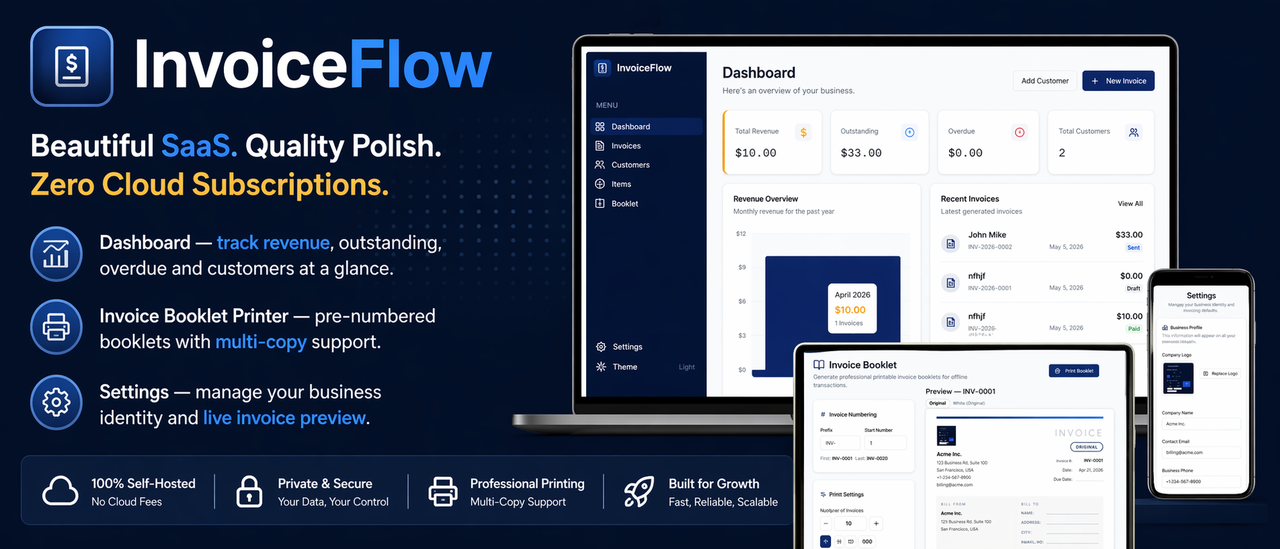
InvoiceFlow Review: The Best Invoice Tool for Beginners?
Let me be completely straight with you before we get into this.
I have been freelancing for a few years now, and the billing side of things was always the part that made me want to close my laptop and go for a walk. Not because invoicing is complicated, but because every tool I used made it feel complicated. There was always a login to remember, a subscription to renew, a plan to upgrade, or a feature sitting behind a paywall I did not want to pay for.
I tried FreshBooks. Then I tried Wave. Then someone in a Facebook group told me to just use a Google Docs template. That lasted about three invoices before I gave up.
Then I found InvoiceFlow and things genuinely changed. This review is going to cover everything from the first install to daily use, and I am not going to hold back on what works and what could be better.
👉 Get InvoiceFlow — One-Time Payment, No Subscription
What Is InvoiceFlow?
InvoiceFlow is a Windows desktop application built specifically for creating and managing professional invoices. It installs on your Windows 10 or Windows 11 computer and runs entirely offline. There is no browser login, no cloud account to set up, no monthly subscription, and your data never leaves your machine.
The people behind it aimed it directly at freelancers, independent consultants, small business owners, tradespeople, and contractors. Basically anyone who needs to send professional invoices to clients without paying SaaS prices every month.
The software handles the full invoicing workflow:
- Building professional invoices with your branding and logo
- Managing a local database of all your clients
- Saving recurring services and products as reusable items
- Tracking every invoice through Draft, Sent, Paid, and Overdue stages
- Sending invoices by email directly from the app
- Generating a revenue dashboard with live business numbers
- Printing physical invoice booklets for offline cash transactions
- Switching between dark and light themes
All of that runs on your own computer, completely independently of any internet connection or third-party server.
The Real Problem InvoiceFlow Is Solving
Before diving into features, it is worth talking about why something like this actually matters.
The SaaS invoicing market has convinced most freelancers and small business owners that paying monthly for billing software is just the normal thing to do. You sign up, get excited about the clean interface, and then three months later you are staring at a $228-per-year charge on your bank statement for a tool you use maybe twice a week.
And what happens if you cancel? Your invoices are stuck on their server. Your client data is locked in their system. You would have to manually export everything before your account goes dark.
The other option most people fall back on is an Excel or Google Docs template. That works, technically, but it is manual, it looks less professional than it could, and you have no way to track whether a client has paid or not without maintaining your own spreadsheet on top of it.
InvoiceFlow sits in the gap between those two worlds. It is as capable as a good SaaS tool, it looks professional, and it costs you nothing after the one-time purchase.
Watch InvoiceFlow In Action First
Before I break down every single feature, watch the official product demo. This will save you ten minutes of reading if you are a visual learner:
Click the video above to watch the full walkthrough on YouTube.
If that demo convinced you, there is no reason to wait.
First Look at the Interface
Here is the invoice list screen, which is where you will spend most of your time in the app:
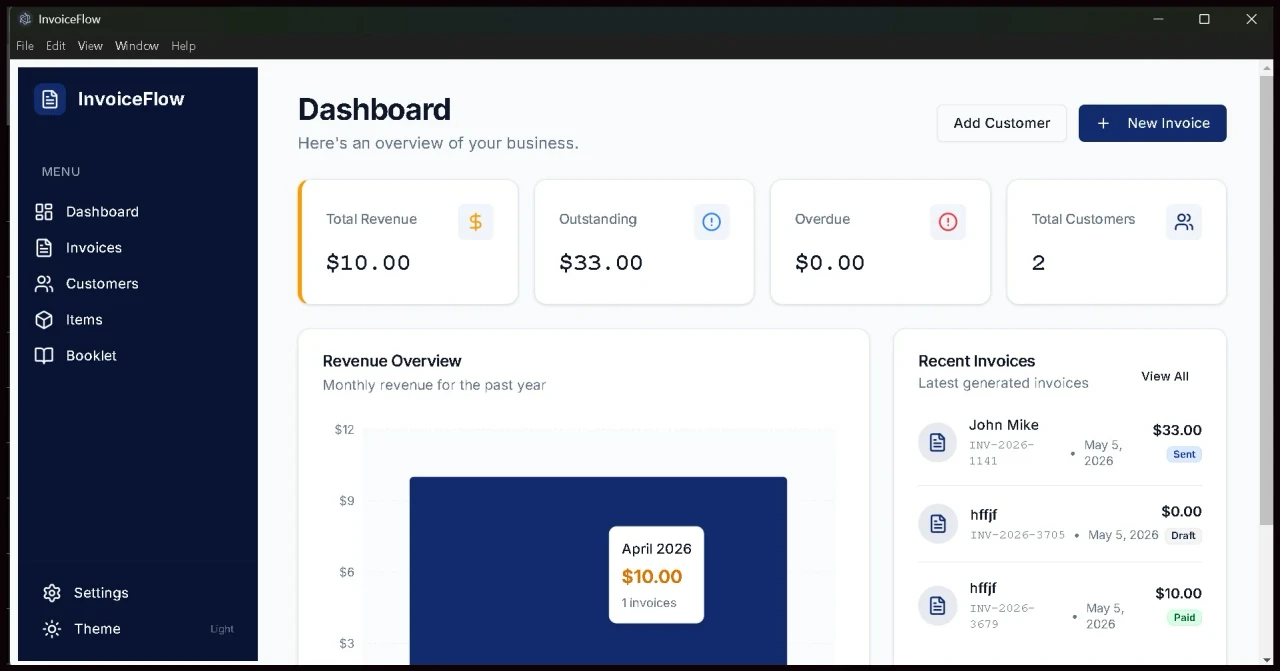
The invoice list view inside InvoiceFlow. Color-coded statuses, a search bar, and your revenue numbers at the bottom. Everything stays on your own PC.
The left sidebar has your navigation: Dashboard, Invoices, Customers, Items, Booklet, and Settings. It stays out of your way and gets you where you need to go in one click.
The main panel shows all your invoices with their status clearly marked. Green for Paid, amber for Sent, red for Overdue, and grey for Draft. The summary bar along the bottom shows your total revenue and outstanding amounts at a glance.
Here is what the invoice creation screen looks like with the live PDF preview on the right side:
Creating a new invoice in InvoiceFlow. The PDF preview updates in real time on the right as you fill in the details.
That right-hand preview is showing exactly what your client will receive as a PDF. Your logo in the header, your line items, the tax calculation, and the total. What you see is exactly what gets sent.
Feature-by-Feature Breakdown
Creating Professional Invoices
The invoice builder is clean and logical. You pick a customer from your saved database, set the issue date and due date, and start adding line items. Each item gets a description, quantity, and unit price. InvoiceFlow handles all the arithmetic, including applying your default tax rate automatically.
Invoice numbers are generated automatically in a sequential format. The default looks like INV-2026-8481. If you prefer a different format, you can set a custom prefix in the settings.
Once the invoice is saved, you can take several actions from the same screen:
- Download a professionally formatted PDF to your Downloads folder
- Send the invoice by email directly from the app
- Update the status as the payment progresses
- Print the invoice to any connected printer
There is no cap on how many invoices you create. Unlimited clients, unlimited invoices, unlimited line items. None of that is gated behind a higher plan because there are no plans.
👉 Get InvoiceFlow and Create Your First Invoice Today
Managing Your Client Database
Every client you add to InvoiceFlow gets a dedicated profile. You store their name, email address, phone number, company name, and billing address. When you open a client profile, you see their complete invoice history in one place.
This is genuinely useful when you have been working with someone for a while. Instead of digging through emails to figure out what you last charged a returning client, or scrolling through a spreadsheet to find their contact details, everything is organised and searchable.
Adding a new client takes about thirty seconds. The form is simple, and once they are saved, selecting them when creating a new invoice is a single dropdown click.
The Items and Services Catalog
This one does not get talked about enough, but for anyone who charges for the same services repeatedly, it is a serious time-saver.
You save a service once by giving it a name, an optional description, and a default price. Next time you create an invoice, you click that item from your saved catalog and the line populates automatically with the description and price already filled in.
For a freelance developer who charges a fixed rate for different types of work, or a photographer who has set rates for different session types, this feature means you never retype the same information twice. That adds up to saved time across hundreds of invoices over the life of your business.
The Revenue Dashboard
When you first open InvoiceFlow, the Dashboard is your home screen. It shows you:
- Total revenue from all invoices with a Paid status
- Total outstanding from invoices marked as Sent but not yet paid
- Overdue invoices that have passed their due date without payment
- Draft invoices that have not been sent yet
- Recent invoice and customer activity
There are no loading indicators, no waiting for data to sync from a server, no API calls in progress. The numbers are already there because the data is already on your computer. Open the app and your business picture is right in front of you in under a second.
👉 Start Tracking Your Revenue With InvoiceFlow
Sending Invoices by Email
InvoiceFlow gives you two methods for emailing invoices, and both of them work well depending on your setup.
Mailto Mode is the simpler of the two. When you click “Send via Email” on an invoice, the app saves the PDF to your Downloads folder and opens your installed email client with the client's address already populated. You attach the saved PDF and hit send. This requires zero configuration and works with any email client installed on your computer.
SMTP Mode is the more automated option. You enter your outgoing mail server details once in the Settings screen. After that, clicking “Send via Email” on any invoice fires the email in the background with the PDF automatically attached. A confirmation message pops up to let you know it was sent. This works with Gmail, Outlook, Yahoo, SendGrid, and any other standard SMTP server.
Setting up Gmail SMTP specifically takes about two minutes. You generate a Gmail App Password from your Google account security settings, enter smtp.gmail.com as the host with port 587, and you are done. The app connects and starts sending without you needing to touch those settings again.
👉 Get InvoiceFlow and Start Sending Professional Invoices
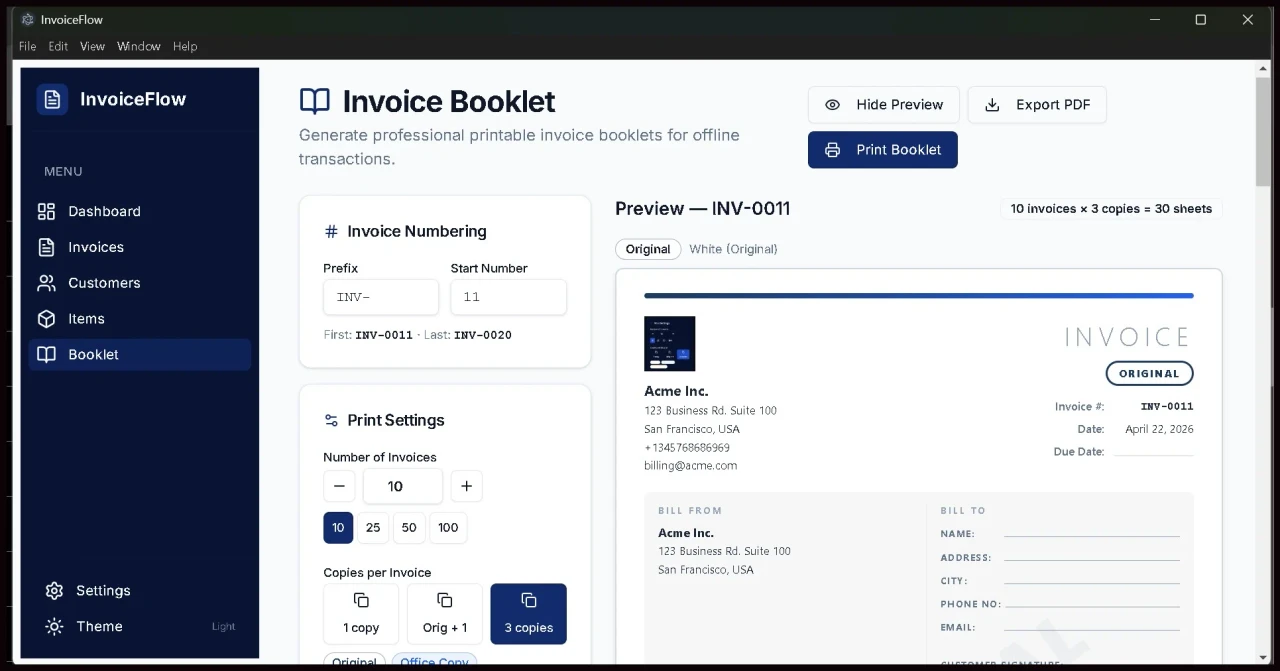
The Invoice Booklet Generator
This is a feature that most invoicing software completely ignores, and it exists for a very real reason.
Not every business transaction happens digitally. Tradespeople doing cash jobs, market stall vendors, delivery services, tutors, mobile service providers, and dozens of other business types still need paper invoice records for clients and for their own accounts.
The Booklet feature in InvoiceFlow lets you generate pre-numbered paper invoice forms. You set a prefix, a starting number, how many invoices to include, and how many copies per sale. The three-copy format mirrors the classic paper invoice book: an Original for you, White for the customer, and Yellow for your filing.
The app generates a clean, formatted booklet PDF that you can preview before printing. Print it directly to any connected printer or export the PDF and print later when you are ready. This is not a feature you will find in FreshBooks or Wave, and it is a genuine differentiator for businesses that work in the physical world.
Dark Mode and Light Mode
This might seem like a small thing, but it matters in practice.
Dark mode is easier on your eyes during long working sessions and at night. Light mode presents a brighter, more document-like appearance that looks natural if you are sharing your screen with a client or during a video call.
You toggle between them from the sidebar with a single click. Your preference is saved automatically, so you do not need to set it again every time you open the app.
👉 Get InvoiceFlow — Works the Way You Work
The Privacy and Data Ownership Case
This section matters a lot more than most people give it credit for.
Every cloud invoicing platform stores your data on servers you have no control over. Your client names, email addresses, billing history, how much different clients pay you, which industries you work in, the size of your business. All of that lives on someone else's infrastructure.
Those platforms can be hacked. They have been hacked before. Companies get acquired and their privacy policies change overnight. Services shut down and you have to scramble to export your data before the deadline.
With InvoiceFlow, your data lives in a single SQLite database file on your own computer at this path:
C:\Users\[YourName]\AppData\Roaming\InvoiceFlow\invoiceflow.db
You can back this file up to a USB drive, an external hard drive, or a cloud storage service you already control. Nobody else has access to it. The InvoiceFlow developers cannot see your invoices. There is no server that can leak your client list.
For anyone working in professional services, legal, financial advising, healthcare consulting, or any field where client confidentiality matters, this is not a bonus feature. It is a baseline requirement.
👉 Own Your Business Data With InvoiceFlow
Installation: What to Expect Step by Step
Getting InvoiceFlow running is genuinely fast. Here is the real process:
Step 1: Purchase from Gumroad and download the ZIP file. It arrives immediately after payment.
Step 2: Extract the ZIP file to find the installer, a Quick-Start PDF guide, the README, and the license file.
Step 3: Double-click InvoiceFlow Setup 1.0.0.exe to start the installer.
Step 4: If Windows SmartScreen displays a warning, click “More info” then “Run anyway.” This is a normal thing that happens with newly released software that has not yet built up a widespread installation history. It is not a sign of anything harmful.
Step 5: Follow the installer prompts. Click Next, then Install, then Finish. The app opens automatically. A shortcut lands on your Desktop.
First-Time Setup — 5 Minutes:
- Open Settings from the sidebar
- Upload your company logo in PNG, JPG, or SVG format
- Fill in your company name, address, email, and phone
- Set your default tax rate and currency
- Click Save Settings
From that point, every invoice you create is fully branded and professional.
Setting Up Email — Optional, 2 Minutes for SMTP:
- Still in Settings, scroll to Email Preferences
- Choose Mailto Mode (no configuration needed) or SMTP Mode
- For SMTP, enter your mail server details and save
You are ready to send your first invoice.
👉 Download InvoiceFlow and Be Set Up in Under 10 Minutes
How Much Are You Actually Saving?
Let me put the cost comparison in plain numbers because it makes the case better than anything else.
| Invoicing Tool | Monthly Fee | 1 Year Cost | 3 Year Cost |
|---|---|---|---|
| FreshBooks Lite | $19/mo | $228 | $684 |
| QuickBooks Simple | $30/mo | $360 | $1,080 |
| Zoho Invoice Pro | $15/mo | $180 | $540 |
| Wave Paid Plan | $16/mo | $192 | $576 |
| InvoiceFlow | $0/mo | One-time | One-time |
If you buy InvoiceFlow at the standard listing price and compare it to even the cheapest SaaS alternative, you have recovered the full cost within two to three months of use. Every month after that is money that stays with you.
Over three years of running a freelance or consulting business, the saving is typically $500 to over $1,000 depending on which SaaS you would have been paying for. That is a meaningful amount for a solo operator watching overhead.
👉 Lock In InvoiceFlow at the One-Time Price
Who Should Buy InvoiceFlow
This Is the Right Fit For You If:
You are a freelancer or independent consultant who sends invoices to clients regularly and has grown tired of monthly billing software fees.
You run a small service business such as cleaning, tutoring, landscaping, photography, IT support, or trades work, and need professional invoices without enterprise-level complexity.
You work in areas where internet connectivity is unreliable and need a tool that works regardless of what your connection is doing.
You work in a field where client data privacy matters and cannot afford to have sensitive billing information stored on third-party servers.
You have been using Excel or Google Docs templates to create invoices and want something that looks more professional without jumping to a subscription.
You are a side hustler building something serious and want to present a professional face to clients without ongoing software costs eating into your margin.
This Might Not Be the Right Fit If:
You need multi-user access where several team members create invoices simultaneously. InvoiceFlow is currently a single-user desktop app.
You are on Mac or Linux. The current version is Windows 10/11 only.
You need built-in accounting features like payroll, expense tracking, or tax filing integrations. InvoiceFlow is focused on invoicing specifically.
If invoicing is your main need and you are on Windows, InvoiceFlow covers that ground completely.
👉 Get InvoiceFlow and Stop Paying Monthly Fees
Common Questions Answered Honestly
Does it actually work with no internet connection at all?
Yes. The only time you touch the internet is when sending emails via SMTP. Everything else, creating invoices, managing clients, generating PDFs, reviewing your dashboard, printing booklets, is completely offline. You could be on a plane or working in a building with no signal and InvoiceFlow works exactly the same.
What happens if my laptop breaks or I need to reinstall Windows?
Back up the file at %APPDATA%\InvoiceFlow\invoiceflow.db before anything happens. Copy it to a USB stick or a cloud service you control. After reinstalling, paste that file back into the same location and open the app. Every invoice, every client, every piece of data comes back exactly as it was.
Is the PDF output actually professional-looking?
Yes. It includes your logo in the header, your business details, the client information, line items with descriptions and prices, tax calculations, a total, and any notes you add. The layout is clean and looks like something produced by a professional billing department.
Can I put my own logo on invoices?
Yes. You upload any PNG, JPG, or SVG in Settings and it appears on every invoice PDF you create from that point.
Are there any limits on the number of invoices or customers?
None. Create as many clients, as many invoices, and as many line items as your business generates. There are no tiers or limits.
What about future updates?
Minor version updates within the v1.x series are free for all existing customers. If a major version upgrade is released in the future, it will be offered to existing customers at a discounted price.
Honest Assessment: The Good and the Could-Be-Better
What Works Really Well
The offline-first approach is not just a marketing claim. The app genuinely opens instantly and everything responds immediately because there is no server round-trip delay on any action. The speed alone is a noticeable quality-of-life improvement over browser-based tools.
The PDF output quality is professional enough to send to corporate clients without hesitation. The layout is clean, the branding looks sharp, and the auto-numbered invoices give it a structured, consistent feel.
The two-method email system is a smart design choice. Mailto Mode makes it accessible for anyone without any technical setup, while SMTP Mode automates the whole process for people who want to set it and forget it.
The Invoice Booklet feature fills a genuine gap in the market. Paper-based businesses are real and most invoicing software completely ignores them.
The privacy argument is genuine and meaningful for professional service providers who handle sensitive client relationships.
What Could Be Better
A Mac and Linux version would massively expand the audience for this product. A lot of freelancers and creatives work on Mac and are locked out right now.
A mobile companion app for logging cash transactions on the go would complement the desktop experience well, especially for tradespeople and mobile service providers working away from their computers.
Multi-device sync between your home desktop and a laptop is not currently possible without manually moving the database file. A local network sync option in a future version would be a welcome improvement.
These are genuinely minor points relative to what the product delivers at its price point. The core experience is solid.
👉 Get InvoiceFlow — The Last Invoicing Purchase You Will Make
Final Verdict
InvoiceFlow is a well-built, focused piece of software that does exactly what it says it will do.
It is not trying to be an accounting suite or a business management platform. It is trying to be the best possible desktop invoice manager for Windows users who want professional results without subscription pricing. At that specific goal, it succeeds clearly.
The feature set covers everything a solo operator or small team needs for the invoicing side of their business. The interface is clean. The PDF output looks professional. The email sending works reliably. The privacy and data ownership story is genuine.
For freelancers, consultants, tradespeople, and small business owners on Windows who send invoices regularly, this is a clear decision. The savings compared to even the cheapest SaaS tool will cover the purchase cost within a couple of months. After that, it is pure savings every month indefinitely.
👉 Get InvoiceFlow Today — One Price, Yours Forever
Quick Reference: Everything InvoiceFlow Includes
- Unlimited invoice creation with auto-numbering
- Full customer and client database stored locally on your PC
- Items and services catalog for quick line-item entry
- Professional branded PDF generation with logo support
- Invoice status tracking through Draft, Sent, Paid, and Overdue
- Revenue dashboard with real-time business summary
- Email sending via Mailto or SMTP (Gmail, Outlook, Yahoo, any SMTP)
- Invoice Booklet printer for physical paper records
- Dark mode and light mode with saved preference
- 100% offline operation with no internet required
- Local SQLite database with no data ever leaving your machine
- Windows 10 and Windows 11 (64-bit)
- One-time payment with no subscription and no renewal
👉 Get InvoiceFlow on Gumroad Right Now
Have a question about InvoiceFlow that this review did not answer? Drop it in the comments below and I will answer from real experience.
Why Offline Software Is Making a Comeback
There is something worth noting about the broader shift happening in how people think about software in 2026.
For a decade, the tech industry pushed everything toward the cloud. SaaS was positioned as the future. Local software was seen as outdated. Pay monthly or fall behind. That was the story.
But a growing number of people, especially independent workers and small business owners, are pushing back. They have experienced what it feels like when a SaaS product raises its prices overnight. They have been through the frustration of a platform going down during a busy work day. They have dealt with data being locked away behind an account they lost access to.
Offline-first software puts control back where it belongs, in your hands. Your tool runs when you need it to run. Your data is where you can see it and back it up yourself. Your workflow does not depend on whether a company's servers are having a good day.
InvoiceFlow fits into this shift naturally. It is not trying to be trendy. It is trying to be useful, reliable, and respectful of your time and data. That combination will outlast any product that sacrifices those values for growth metrics.
One More Thing Before You Decide
If you are still on the fence, consider this framing.
Think about the next 12 months of your freelance or business work. If you send even ten invoices a month to clients, that is 120 billing interactions over the next year. Each one represents money coming into your business.
How much of that money are you willing to hand back to a SaaS company just for the privilege of sending a professional PDF?
With InvoiceFlow, the answer is zero. You pay once, and those 120 invoice moments, and the 120 after that, and the 120 after that, are handled by a tool that you own.
That is not a small thing when you are building something for yourself.
👉 Click Here to Get InvoiceFlow and Keep More of What You Earn
More Posts:
- Google Unveils Simula: A Reasoning-Centric System for Building Controllable, Scalable Synthetic Datasets Across Specialized AI Fields
- The Ultimate Guide to Inference Caching for Large Language Models
- OpenAI Launches $100 ChatGPT Pro Plan with 5x Higher Codex Limits Than Plus
- What Is Search Box Optimization (SBO) and Why It’s the Next Big Thing in Digital Marketing
- How One AI Platform Is Replacing 10 Separate Tools (And Why Creators Are Taking Notice)