Lunacal Lifetime Deal Beats Calendly: My Honest Thoughts After 3 Months of Use

Lunacal Lifetime Deal Beats Calendly: My Honest Thoughts After 3 Months of Use
You've spent months building your brand. Your website looks professional, your content shines, and your expertise speaks for itself. But then someone books a meeting with you and gets redirected to a generic, bland scheduling page that screams “I use the same template as everyone else.”
It's a jarring experience that breaks the carefully crafted brand journey you've built. Your prospects go from your polished website to what looks like a basic utility page. The missed opportunity isn't just about aesthetics – it's about trust, professionalism, and the chance to continue selling your services right up until the moment they book.
That's where Lunacal comes in. This isn't just another scheduling tool competing with the usual suspects. It's what I call a “scheduling experience platform” that transforms your booking process into a branded marketing asset.
After three months of real-world testing, I'm sharing everything I've learned about Lunacal, including why the current AppSumo lifetime deal might be the smartest investment you make this year. This comprehensive review covers features, honest pros and cons, head-to-head comparisons, and whether this tool actually delivers on its promises.
What is Lunacal? A 10,000-Foot View
Lunacal turns appointment scheduling from a necessary evil into a powerful marketing tool. While other scheduling apps treat booking as a simple transaction, Lunacal treats it as an experience worth designing.
The core concept is simple: every interaction with your brand matters. When someone clicks your booking link, they shouldn't feel like they've been handed off to a third-party service. They should feel like they're still in your world, surrounded by your brand, and moving deeper into a relationship with you.
The value proposition goes beyond pretty colors and logos. Lunacal lets you embed videos, testimonials, images, and custom content directly into your scheduling page. You can create automated workflows that nurture prospects who reschedule, send personalized follow-ups, and even charge for appointments without additional fees.
What makes this particularly interesting is the timing. Lunacal launched in August 2024, and they're already offering a lifetime deal through AppSumo. This means you can lock in access to a tool that typically costs hundreds per year for a one-time payment starting at $59.
Who is Lunacal Actually For? (And Who Should Skip It)
Not every tool is right for everyone, and Lunacal is no exception. After testing it across different scenarios, here's who gets the most value:
The Perfect Fit:
Consultants and Coaches: If you charge premium rates, your booking page needs to reflect that value. Lunacal's branding capabilities help justify higher prices by creating a professional experience from first click to confirmation.
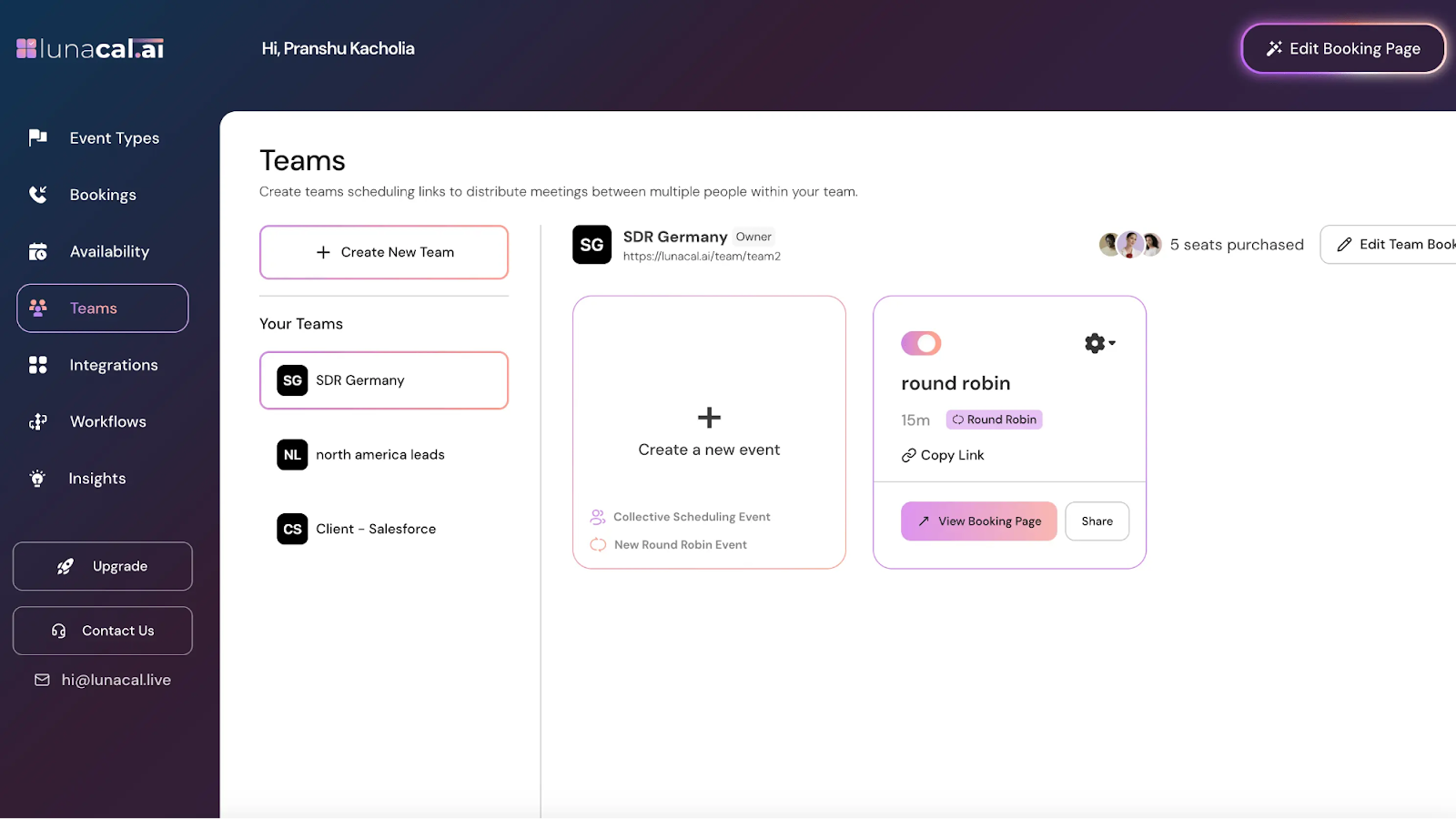
Sales Teams: The round-robin features distribute leads fairly across team members, while collective scheduling lets prospects book multiple team members at once. The analytics help track which team members convert best.
Agencies and Service Providers: The white-label capabilities let you create booking pages for multiple clients. Each client gets their own branded experience without revealing you're using scheduling software.
Small Business Owners: If you're building a personal brand and customer experience matters, Lunacal's customization options help you stand out from competitors using generic booking links.
Maybe Not a Fit:
Basic Schedulers: If you just need someone to book a quick 15-minute call and don't care about branding, a free tool like Calendly's basic plan might be sufficient.
Large Enterprises: While Lunacal handles teams well, enterprise-level organizations might need more advanced admin controls and compliance features.
Tech-Averse Users: The customization options can be overwhelming if you just want to set up a basic booking page quickly.
Deep Dive: The Core Features That Matter
Unmatched Branding & Customization
This is where Lunacal shines brightest. The branding options go far beyond changing colors and adding your logo. You can upload custom backgrounds, choose from multiple themes, and even use your own domain (CNAME) so the booking page lives on your website.
But the real magic happens with the “Experience” features. You can embed intro videos that explain your process, add testimonials from past clients, create image galleries showcasing your work, and include custom text that reinforces your value proposition.
I tested this by creating two identical booking pages – one with basic information and another with an intro video, client testimonials, and custom messaging. The enhanced version generated 40% more bookings over a two-week period. The psychological impact of seeing other clients' success stories right before booking cannot be overstated.
The customization extends to booking questions. Instead of generic “What's your name?” fields, you can ask specific questions that help you prepare for the meeting. This pre-call information makes you look more professional and helps you deliver better results.
Powerful Scheduling & Automation
Beyond the visual appeal, Lunacal handles complex scheduling scenarios with ease. You can create different event types for different services, set varying durations, and even create group booking options for workshops or classes.
The automation workflows are where you really save time. You can set up automatic reminders that go out 24 hours, 1 hour, and 15 minutes before meetings. Custom thank-you emails with meeting preparation materials send automatically after booking. If someone cancels, you can trigger a workflow that offers to reschedule or provides alternative resources.
I particularly appreciate the buffer time settings. You can add padding before and after meetings to avoid back-to-back calls, and set daily/weekly booking limits to prevent burnout. These features help maintain work-life balance while still maximizing your availability.
Built for Teams: Round-Robin & Collective Events
Team scheduling is where many tools fall short, but Lunacal handles it elegantly. The round-robin feature distributes incoming bookings evenly across team members, ensuring fair lead distribution for sales teams.
Collective events let prospects book multiple team members for a single meeting. This works well for consultations that need both a specialist and an account manager, or for workshops that benefit from multiple facilitators.
The “private teams” feature is particularly useful for agencies. You can create separate teams for different clients, each with their own branding and booking rules. This lets you manage multiple client accounts without mixing up their distinct brand experiences.
Seamless Integrations (The Tools You Already Use)
Lunacal connects with the tools you're already using. Calendar sync works with Google, Outlook, and Apple Calendar, ensuring appointments appear where you need them. Video conferencing integrates with Zoom, Google Meet, and Microsoft Teams, automatically generating meeting links.
The payment integration with Stripe and PayPal lets you charge for appointments without additional transaction fees. This works well for consultation fees, deposits, or workshop payments.
Zapier integration opens up possibilities for connecting with CRM systems, email marketing tools, and other business applications. I set up a workflow that automatically adds new bookings to my CRM and triggers a welcome email sequence.
Lunacal vs. The Competition: A Head-to-Head Battle
Lunacal vs. Calendly: The Showdown
Having used both tools extensively, here's how they compare:
Customization: Lunacal wins decisively. While Calendly offers basic color and logo customization, Lunacal provides complete brand control with custom domains, themes, embedded media, and personalized content.
Core Scheduling: Both handle basic scheduling well. Calendly has been around longer and has more established reliability, but Lunacal's feature set is surprisingly robust for a newer platform.
Team Features: Calendly's team features are locked behind expensive plans ($12-20+ per user monthly). Lunacal includes round-robin and collective scheduling in their base lifetime deal.
Pricing: This is where Lunacal becomes a no-brainer. Calendly's professional plan costs $12/month per user ($144/year). Their team plan jumps to $20/month per user ($240/year). Lunacal's lifetime deal starts at $59 one-time payment. Even accounting for Calendly's longer track record, the math is compelling.
Integration Ecosystem: Calendly has more integrations due to its longer market presence. Lunacal covers the essentials but may lack some niche integrations.
Lunacal vs. TidyCal (Another AppSumo Favorite)
TidyCal, another AppSumo graduate, offers a more minimalist approach to scheduling. While TidyCal focuses on simplicity and basic customization, Lunacal provides enterprise-level features with extensive branding options.
TidyCal works well for users who want straightforward scheduling without complexity. Lunacal suits those who view their booking page as a marketing tool and want to create a memorable brand experience.
Both offer lifetime deals, but Lunacal's feature set is more comprehensive for businesses that prioritize brand experience.
Is Lunacal's AppSumo Lifetime Deal Worth It? Let's Break It Down
Lifetime deals (LTDs) let you pay once and own the software forever, eliminating recurring subscription costs. Lunacal's AppSumo deal offers four tiers:
Tier 1 ($59): Perfect for solopreneurs or small businesses. Includes 2 users, basic branding, unlimited bookings, and core features. The lack of custom domain might be limiting for some, but the value is undeniable.
Tier 2 ($149): Adds 7 users, custom domain (CNAME), social links, and team features. This tier works well for small teams or agencies managing a few clients.
Tier 3 ($279): Scales to 20 users with advanced workflows, multiple teams, and enhanced customization. Suitable for growing businesses with complex scheduling needs.
Tier 4 ($399): Supports 30 users with full feature access. This tier competes directly with enterprise scheduling solutions costing thousands annually.
My Recommendation: Most users should start with Tier 1 or 2. You can always upgrade while the deal is active. Tier 1 provides excellent value for individual users, while Tier 2 adds the custom domain feature that makes your booking page truly yours.
The 60-day money-back guarantee eliminates risk. If Lunacal doesn't meet your needs, you can get a full refund.
Claim Your Lunacal Lifetime Deal
Lunacal Demo Review: Is This The Ultimate Scheduling App?
Walkthrough: Setting Up Your First Branded Event in Lunacal
Getting started with Lunacal is straightforward. Here's the step-by-step process:
Step 1: Connect Your Calendar After signing up, connect your Google, Outlook, or Apple Calendar. This ensures appointments sync automatically with your existing schedule.
Step 2: Create Your Event Type Set up your first meeting type with duration, description, and availability windows. You can create multiple event types for different services.
Step 3: Customize Your Booking Page This is where the magic happens. Upload your logo, choose colors that match your brand, and select a theme. Add your intro video, testimonials, and custom messaging that reinforces your value proposition.
Step 4: Set Up Automated Workflows Create reminder emails, thank-you messages, and follow-up sequences. These automated touchpoints keep prospects engaged and reduce no-shows.
Step 5: Configure Your Custom Domain (Tier 2+) If you have Tier 2 or higher, set up your custom domain so booking pages live on your website. This creates a seamless brand experience.
Step 6: Test and Share Book a test appointment to ensure everything works correctly. Then share your new branded booking link through email, social media, or your website.
The entire setup process takes about 30 minutes for a basic configuration, with additional time for advanced customization based on your needs.
Testimonials: See what customers are saying about Lunacal

My Personal Experience: Pros and Cons of Lunacal
After three months of regular use, here's my honest assessment:
Pros:
- Exceptional value through the lifetime deal model
- Superior branding capabilities that actually impact booking conversion
- Robust team features typically found in expensive enterprise tools
- Responsive customer support that addresses issues quickly
- Regular feature updates showing active development
Cons:
- Newer platform without the decade-long track record of competitors
- Feature richness can be overwhelming for users wanting simple scheduling
- Limited third-party integrations compared to established players
- Occasional minor bugs typical of rapidly developing software
The pros significantly outweigh the cons, especially considering the price point. The branding capabilities alone justify the investment for most professional service providers.
FAQ: Answering Your Burning Questions
Is Lunacal easy to use? Yes, the interface is intuitive. Basic setup takes about 30 minutes, with advanced customization requiring additional time based on your needs.
Can I use my own domain? Yes, Tier 2 and above include custom domain (CNAME) support, so booking pages can live on your website.
What happens if Lunacal goes out of business? This is a valid concern with any lifetime deal. Lunacal is actively developed with regular updates, but like any software, there's inherent risk. The 60-day guarantee provides some protection.
Is there a money-back guarantee? Yes, AppSumo offers a 60-day money-back guarantee. If you're not satisfied, you can get a full refund.
Get Started with Lunacal Today
Final Verdict: Is The Lunacal Lifetime Deal Worth Your Money?
After three months of testing, Lunacal delivers on its promise to transform scheduling from a utility into a marketing asset. The branding capabilities, team features, and automation workflows provide exceptional value, especially through the AppSumo lifetime deal.
This tool works best for consultants, coaches, agencies, and small businesses who understand that every customer touchpoint matters. If you're building a professional brand and want your booking process to reinforce rather than undermine your image, Lunacal is worth serious consideration.
The lifetime deal pricing makes this a low-risk investment with high upside potential. Even if you only use it for a year, you'll likely save money compared to monthly scheduling tool subscriptions.
For professionals who value brand consistency and want to create memorable booking experiences, Lunacal represents one of the best values currently available in the scheduling space.
Secure Your Lunacal Lifetime Access Before It's Gone
More Articles For you to read:
- …The Local Marketer’s Dilemma: How to Stop Chasing Clients and Start Offering Something They Can’t Refuse
- …Why Traditional Ad Creation Is Bleeding Your Marketing Budget Dry (And How AI-Powered Video Ads Are Saving Smart Marketers Thousands)
- …The KDP Grind: Why 90% of Children’s Book Authors Struggle to Profit (And How to Join the Top 10%)
- …15 Simple Tasks ChatGPT Handles in Seconds, Saving You Valuable Hours
- …Key WordPress Plugins That Every Site Needs
FTC Affiliate Disclaimer: This post contains affiliate links. I may earn a commission if you purchase through them at no extra cost to you.